----------------------------------------------------------------------
--- Knud van Eeden --- 27 August 2008 - 04:21 am ---------------------
Language: Computer: BASIC: BBCBASIC: Windows: Unicode: Character: World: How to find the Unicode value for a given character? [Chinese, Japanese, Korean, Greek, Arabic, Hebrew, Cyrillic, Hindi, ...]
---
It is actually very easy to find the Unicode of a given character
(be it Arabic, Russian, Hindi, Chinese, Japanese, Korean, Slovak,
German, ...)
By copying the Russian text as shown below from a web page to Windows
Notepad, then saving this, and then loading it in a hexadecimal text
editor, I saw quickly the structure of the file.
It starts (always) with the hexadecimal numbers 'FF FE' .
Then followed by the Unicode value for each character.
1. It is similar to a XY coordinate system in mathematics,
where you have numbered planes, and a x and y value.
If you know the plane, the x and the y value for a
point, you can exactly find its location.
2. This Unicode consists of 2 numbers.
3. To get that 2 numbers, e.g. run the BBCBASIC program (see below).
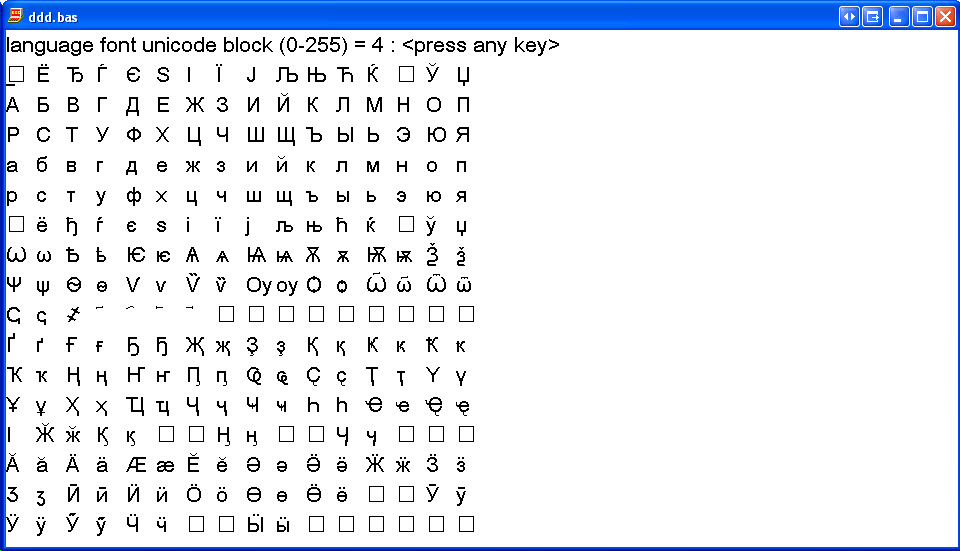
4. That shows you 0 to 255 pages, with on each 0 to 255 characters.
5. First find the page on which the character is located
6. First search the position of that character in the page (starting
from 0 to 255). Write that number in hexadecimal.
E.g. 1F
7. Second note the number of the page (starting from 0 to 255). Write
that number in hexadecimal.
E.g. 04
8. For example: Russian
Take e.g. the following words
?????????? ?????????
Each of this single characters has a Unicode.
So go from left to right through the characters and check their positions in the pages.
That will give you the 2 hexadecimal numbers for each character.
9. If you run my BBCBASIC program (see below), you see that almost all characters are on 'page 04'.
Thus the second number for each Russian characters is hexadecimal 04.
Thus you can already write for your Unicode table:
? = ? 04
? = ? 04
? = ? 04
? = ? 04
? = ? 04
? = ? 04
? = ? 04
? = ? 04
?? = ? 04
? = ? 04
? = ? 04
? = ? 04
? = ? 04
? = ? 04
? = ? 04
? = ? 04
? = ? 04
? = ? 04
10. To get the second character you can e.g. count visually its position in page 04.
-The first row goes from 0 to 15 decimal, or thus from 0 to F hexadecimal
-The second row goes from 10 to 1F hexadecimal
-The third row goes from 20 to 2F hexadecimal
-The fourth row goes from 30 to 3F hexadecimal.
and so on.
-You can thus quickly build that number mentally.
-The first digit is the row number from 0 to F.
-The second digit is the column number from 0 to F.
-Or if you count decimal, count first the row number starting from 0, and convert that to hexadecimal.
-And similar count the column number, starting from 0, and convert that to hexadecimal.
-Then concatenate that 2 digits together to 1 number.
-That will be the first of the 2 numbers, for that character.
11. Running the BBCBASIC program and looking at the position of each Unicode character,
lets you further fill your Unicode table:
In general:
<character> = <hexadecimal( row number decimal - 1)><hexadecimal( column number decimal - 1)>
Starting the count from 0, you can thus write:
? = 1F 04 = row 1, column F, page 4
? = 3E 04 = row 4, column E, page 4
? = 3A 04 = row 4, column B, page 4
? = 30 04 = row 3, column 0, page 4
? = 37 04 = row 3, column 7, page 4
? = 4B 04 = row 4, column B, page 4
? = 32 04 = row 3, column 2, page 4
? = 30 04 = row 3, column 0, page 4
? = 42 04 = row 4, column 2, page 4
? = 4C 04 = row 4, column C, page 4
the space in between you can find on page 0,
row 2, column 0.
Thus will be 20 00
? = 3F 04 = row 3, column F, page 4
? = 3E 04 = row 3, column E, page 4
? = 34 04 = row 3, column 4, page 4
? = 41 04 = row 4, column 1, page 4
? = 3A 04 = row 4, column B, page 4
? = 30 04 = row 3, column 0, page 4
? = 37 04 = row 3, column 7, page 4
? = 3A 04 = row 4, column B, page 4
? = 38 04 = row 3, column 8, page 4.
Your Notepad file, seen in a hexadecimal editor (or using a BBCBASIC
program which reads the bytes of your file and shows them in
hexadecimal notation), will thus show
FF FE 1F 04 3E 04 3A 04 30 04 37 04 4B 04 32 04 30 04 42 04 4C 04 20 00 3F 04 3E 04 34 04 41 04 3A 04 30 04 37 04 3A 04 38 04
Or thus FF FE followed by the Unicodes for each character, in the order of the characters in your words in the string.
You can also check it by saving the (Russian words) to Notepad, saving it,
and check the values after the first 'FF FE', to get the Unicode values more automatically.
12. The other way around.
You know the Unicode of a given character, and you want to know on which page to find it.
E.g.
Given a character (say an Arabic, Japanese, Korean, Chinese or Hindi
character), which you see in a web page on the Internet.
Copy that character.
Paste that character e.g. in Notepad, save that file, open it e.g. in a hexadecimal editor,
and check the number of a given character.
You will see e.g. FF FE 2F 4D
The first two bytes you take away, because that is constant information
occurring in each Unicode file in the beginning.
That leaves you with 2F 4D
You see thus that the second number, thus the page is 4D hexadecimal,
thus you know that you have to go 4 . 16 + 13 = page 78 decimal,
starting from page 0.
The first number gives you the row,
respectively the
Then you have to go row 2 (starting from row 0).
Finally to column F (starting from column 0).
There you will find that given character.
13. -In BBCBASIC itself, the CHR$() number you should use is built the
other way around. First the page, then the row + column number.
===
E.g.
1F 04
becomes thus
CHR$( &04 ) + CHR$( 1F )
===
E.g.
2F 4D
becomes thus
CHR$( &4D ) + CHR$( 2F )
14. Here a BBCBASIC program which you can use for looking up.
--- cut here: begin --------------------------------------------------
REM you must have a UniCode font installed
REM Check this e.g. in 'Control panel'->'Fonts'
REM (if not, install e.g. from the Microsoft (XP) CD)
REM (choose 'Install new font' in the 'File' menu
REM in the 'control panel' 'fonts' screen))
:
REM *FONT Tahoma, 16
:
*FONT Arial Unicode MS, 16
:
PROCUnicodePageAll( 0, 470, 30, 500, 30, 30 )
END
:
:
:
DEF PROCUnicodePageAll( xScreenMinI%, xScreenMaxI%, yScreenMinI%, yScreenMaxI%, xScreenStepI%, yScreenStepI% )
LOCAL byte1I%
LOCAL byte2I%
LOCAL xScreenI%
LOCAL yScreenI%
:
FOR byte2I% = 0 TO 255
:
xScreenI% = xScreenMinI%
yScreenI% = yScreenMinI%
:
CLG
:
PRINT TAB( 0, 0 );
PRINT; "language font unicode block (0-255) = "; byte2I%;
PRINT; " : <press any key>"
:
FOR byte1I% = 0 TO 255
:
PROCUnicode( byte1I%, byte2I%, xScreenI%, yScreenI% )
:
xScreenI% += xScreenStepI%
:
IF xScreenI% > xScreenMaxI% THEN
xScreenI% = xScreenMinI%
yScreenI% = yScreenI% + yScreenStepI%
ENDIF
:
NEXT byte1I%
:
REPEAT UNTIL GET
:
NEXT byte2I%
:
ENDPROC
:
DEF PROCUnicode( byte1I%, byte2I%, xScreenI%, yScreenI% )
LOCAL uniCode$
uniCode$ = CHR$( byte1I% ) + CHR$( byte2I% )
SYS "TextOutW", @memhdc%, xScreenI%, yScreenI%, uniCode$, LEN( uniCode$ ) / 2
SYS "InvalidateRect", @hwnd%, 0, 0
ENDPROC
:
--- cut here: end ----------------------------------------------------
===
Book: see also:
===
Diagram: see also:
===
File: see also:
===
File: version: control: see also:
===
Help: see also:
===
Image: see also:
 ===
Internet: see also:
===
Podcast: see also:
===
Record: see also:
===
Screencast: see also:
===
Table: see also:
===
Video: see also:
===
<version>1.0.0.0.1</version>
----------------------------------------------------------------------
===
Internet: see also:
===
Podcast: see also:
===
Record: see also:
===
Screencast: see also:
===
Table: see also:
===
Video: see also:
===
<version>1.0.0.0.1</version>
----------------------------------------------------------------------
