<?xml version="1.0"?>
<?xml-stylesheet type="text/xsl" href="xml_to_sql.xsl"?>
<table name="yourTableName">
<record>
<a>56
<b>1222</b>
<c>78.5</c>
</record>
<record>
<x>45</x>
<y>-10</y>
</record>
<record>
<x>12</x>
<b>10459</b>
<a>756
<y>9</y>
</record>
</table>
--- cut here: end ----------------------------------------------------
2. -Save this program as
--- cut here: begin --------------------------------------------------
xml_to_sql.xml
--- cut here: end ----------------------------------------------------
3. -E.g. create the following XSLT program:
--- cut here: begin --------------------------------------------------
<?xml version="1.0"?>
<xsl:stylesheet version="1.0" xmlns:xsl="">http://www.w3.org/1999/XSL/Transform">
<!-- output as text, strip whitespace -->
<xsl:output method="text" indent="no" />
<xsl:strip-space elements="*"/>
<!-- look for the table node -->
<xsl:template match="/table" >
<!-- iterate through each record -->
<xsl:for-each select="record">
<!-- get the table name -->
<xsl:text>INSERT INTO </xsl:text>
<xsl:value-of select="/table/@name" />
<xsl:text>(</xsl:text>
<!-- iterate through child elements and get field names -->
<xsl:for-each select="child::*">
<xsl:value-of select="name()" />
<xsl:if test="position() != last()">, </xsl:if>
</xsl:for-each>
<xsl:text>) VALUES(</xsl:text>
<!-- iterate through child elements and get values -->
<xsl:for-each select="child::*">
<xsl:text>"</xsl:text>
<xsl:value-of select="." />
<xsl:text>"</xsl:text>
<xsl:if test="position() != last()">
<xsl:text>,</xsl:text>
</xsl:if>
</xsl:for-each>
<xsl:text>);</xsl:text>
</xsl:for-each>
</xsl:template>
</xsl:stylesheet>
--- cut here: end ----------------------------------------------------
4. -Save this program as
--- cut here: begin --------------------------------------------------
xml_to_sql.xsl
--- cut here: end ----------------------------------------------------
5. -Run the program
1. -E.g. by loading the xml_to_sql.xml in your browser
6. -That will show a screen output similar to the following:
--- cut here: begin --------------------------------------------------
INSERT INTO yourTableName(a, b, c) VALUES("56","1222","78.5");INSERT INTO yourTableName(x, y) VALUES("45","-10");INSERT INTO yourTableName(x, b, a, y) VALUES("12","10459","756","9");
--- cut here: end ----------------------------------------------------
7. -To store this in your (MySql) database,
use e.g. the following in your (MySql) database client (mysql.exe)
--- cut here: begin --------------------------------------------------
CREATE DATABASE yourDatabaseName;
USE yourDatabaseName;
DROP TABLE IF EXISTS yourTableName;
CREATE TABLE yourTableName (
a VARCHAR( 255 ),
b VARCHAR( 255 ),
c VARCHAR( 255 ),
x VARCHAR( 255 ),
y VARCHAR( 255 )
);
--- cut here: end ----------------------------------------------------
8. -Copy/paste this above INSERT text in your (MySql) database client
9. -That will show a screen output similar to the following:
--- cut here: begin --------------------------------------------------
Query OK, 1 row affected (0.00 sec)
Query OK, 1 row affected (0.00 sec)
Query OK, 1 row affected (0.00 sec)
--- cut here: end ----------------------------------------------------
10. Another variation of a possible XSLT program,
-- created by author Jim Sylva --
also automatically extracts all the necessary column names of the table
for the SQL database table creation
--- cut here: begin --------------------------------------------------
<?xml version="1.0"?>
<xsl:stylesheet version="1.0" xmlns:xsl="">http://www.w3.org/1999/XSL/Transform">
<xsl:output method="text" indent="no" />
<xsl:key name="record"
match="record/child::*"
use="name()" />
<xsl:strip-space elements="*"/>
<xsl:param name="table-name" select="table/@name" />
<xsl:template match="/" >
<xsl:apply-templates mode="drop-table"/>
<xsl:apply-templates mode="create-table"/>
<xsl:apply-templates select="table/record" mode="insert-values" />
</xsl:template>
<!-- Drop Table -->
<xsl:template match="table" mode="drop-table">
<xsl:text>DROP TABLE IF EXISTS </xsl:text>
<xsl:value-of select="concat($table-name,';')" />
<!-- create new line and an empty line -->
<xsl:text>
</xsl:text>
</xsl:template>
<!-- Create Table -->
<xsl:template match="table" mode="create-table">
<xsl:text>CREATE TABLE </xsl:text>
<xsl:value-of select="concat($table-name,' (')" />
<xsl:text>
</xsl:text>
<xsl:apply-templates select="." mode="declare-columns" />
</xsl:template>
<!-- Declare Columns -->
<xsl:template match="table" mode="declare-columns">
<!-- Muenchen grouping of column names -->
<xsl:for-each select="record/child::*[generate-id() = generate-id(key('record',name())[1])]">
<xsl:sort select="name()" />
<xsl:text> </xsl:text>
<xsl:value-of select="name()" /><xsl:text> VARCHAR ( 255 )</xsl:text>
<xsl:choose>
<xsl:when test="position() != last()">, </xsl:when>
<xsl:otherwise>
<xsl:text>
);
</xsl:text>
</xsl:otherwise>
</xsl:choose>
<xsl:text>
</xsl:text>
</xsl:for-each>
</xsl:template>
<!-- Insert Values -->
<xsl:template match="record" mode="insert-values">
<xsl:text>INSERT INTO </xsl:text>
<xsl:value-of select="$table-name" />
<xsl:text>(</xsl:text>
<xsl:apply-templates select="child::*" mode="insert" />
<xsl:text>VALUES(</xsl:text>
<xsl:apply-templates select="child::*" mode="values" />
<xsl:text>
</xsl:text>
</xsl:template>
<!-- Insert -->
<xsl:template match="child::*" mode="insert">
<xsl:value-of select="name()" />
<xsl:choose>
<xsl:when test="position() != last()">, </xsl:when>
<xsl:otherwise>) </xsl:otherwise>
</xsl:choose>
</xsl:template>
<!-- Values -->
<xsl:template match="child::*" mode="values">
<xsl:param name="quoted-value" select="concat('"',.,'"')" />
<xsl:value-of select="$quoted-value" />
<xsl:choose>
<xsl:when test="position() != last()">,</xsl:when>
<xsl:otherwise>);</xsl:otherwise>
</xsl:choose>
</xsl:template>
</xsl:stylesheet>
--- cut here: end ----------------------------------------------------
11. -That will show a screen output similar to the following:
--- cut here: begin --------------------------------------------------
DROP TABLE IF EXISTS yourTableName; CREATE TABLE yourTableName ( a VARCHAR ( 255 ), b VARCHAR ( 255 ), c VARCHAR ( 255 ), x VARCHAR ( 255 ), y VARCHAR ( 255 ) ); INSERT INTO yourTableName(a, b, c) VALUES("56","1222","78.5"); INSERT INTO yourTableName(x, y) VALUES("45","-10"); INSERT INTO yourTableName(x, b, a, y) VALUES("12","10459","756","9");
--- cut here: end ----------------------------------------------------
12. -To see the current content of the table, use e.g. the following SQL query
in your (MySql) database client (mysql.exe)
--- cut here: begin --------------------------------------------------
> SELECT * FROM yourTableName;
+------+-------+------+------+------+
| a | b | c | x | y |
+------+-------+------+------+------+
| 56 | 1222 | 78.5 | NULL | NULL |
| NULL | NULL | NULL | 45 | -10 |
| 756 | 10459 | NULL | 12 | 9 |
+------+-------+------+------+------+
3 rows in set (0.11 sec)
--- cut here: end ----------------------------------------------------
13. -To get the text of the table, you can copy/paste it
(e.g. click left top icon in your MSDOS box, 'Edit'->'Mark', highlight, <ENTER>
and or pipe '>' to an output file)
14. -To export this table data to comma separated values (.CSV),
type the following SQL query
Note: you will have to use a forward slash '/' in the filename path
(thus not a backward slash '\')
--- cut here: begin --------------------------------------------------
SELECT * INTO OUTFILE 'c:/yourTest.txt' FIELDS TERMINATED BY ',' OPTIONALLY ENCLOSED BY '"' LINES TERMINATED BY '\n' FROM yourTableName;
--- cut here: end ----------------------------------------------------
15. -That will show a screen output similar to the following:
--- cut here: begin --------------------------------------------------
Query OK, 3 rows affected (0.31 sec)
--- cut here: end ----------------------------------------------------
16. -Loading this file 'c:\yourTest.txt' shows
--- cut here: begin --------------------------------------------------
"56","1222","78.5",\N,\N
\N,\N,\N,"45","-10"
"756","10459",\N,"12","9"
--- cut here: end ----------------------------------------------------
17. -If you should want to export your table(s) in MySql back to XML
start your MySql command line client with the -X or --xml parameter
E.g.
--- cut here: begin --------------------------------------------------
mysql.exe -u root -X
--- cut here: end ----------------------------------------------------
18. -Show the 'yourTableName' table in XML format
--- cut here: begin --------------------------------------------------
USE yourDatabaseName;
SELECT * FROM yourTableName;
--- cut here: end ----------------------------------------------------
19. -That will show a screen output similar to the following:
(which you can copy/paste from the screen,
and or pipe '>' to an output file)
--- cut here: begin --------------------------------------------------
<?xml version="1.0"?>
<resultset statement="SELECT * FROM yourTableName" xmlns:xsi="">http://www.w3.org/2001/XMLSchema-instance">
<row>
<field name="a">56</field>
<field name="b">1222</field>
<field name="c">78.5</field>
<field name="x" xsi:nil="true" />
<field name="y" xsi:nil="true" />
</row>
<row>
<field name="a" xsi:nil="true" />
<field name="b" xsi:nil="true" />
<field name="c" xsi:nil="true" />
<field name="x">45</field>
<field name="y">-10</field>
</row>
<row>
<field name="a">756</field>
<field name="b">10459</field>
<field name="c" xsi:nil="true" />
<field name="x">12</field>
<field name="y">9</field>
</row>
</resultset>
3 rows in set (0.15 sec)
--- cut here: end ----------------------------------------------------
---
Tested successfully on
Microsoft Windows XP Professional (service pack 2),
running
Microsoft Internet Explorer v7,
Mysql v5.0.37
===
Book: see also:
[book: source: XML and PHP by Vikram Vaswani - Publisher: Sams - Pub Date: June 06, 2002 - ISBN: 0-7357-1227-1]
===
Diagram: see also:
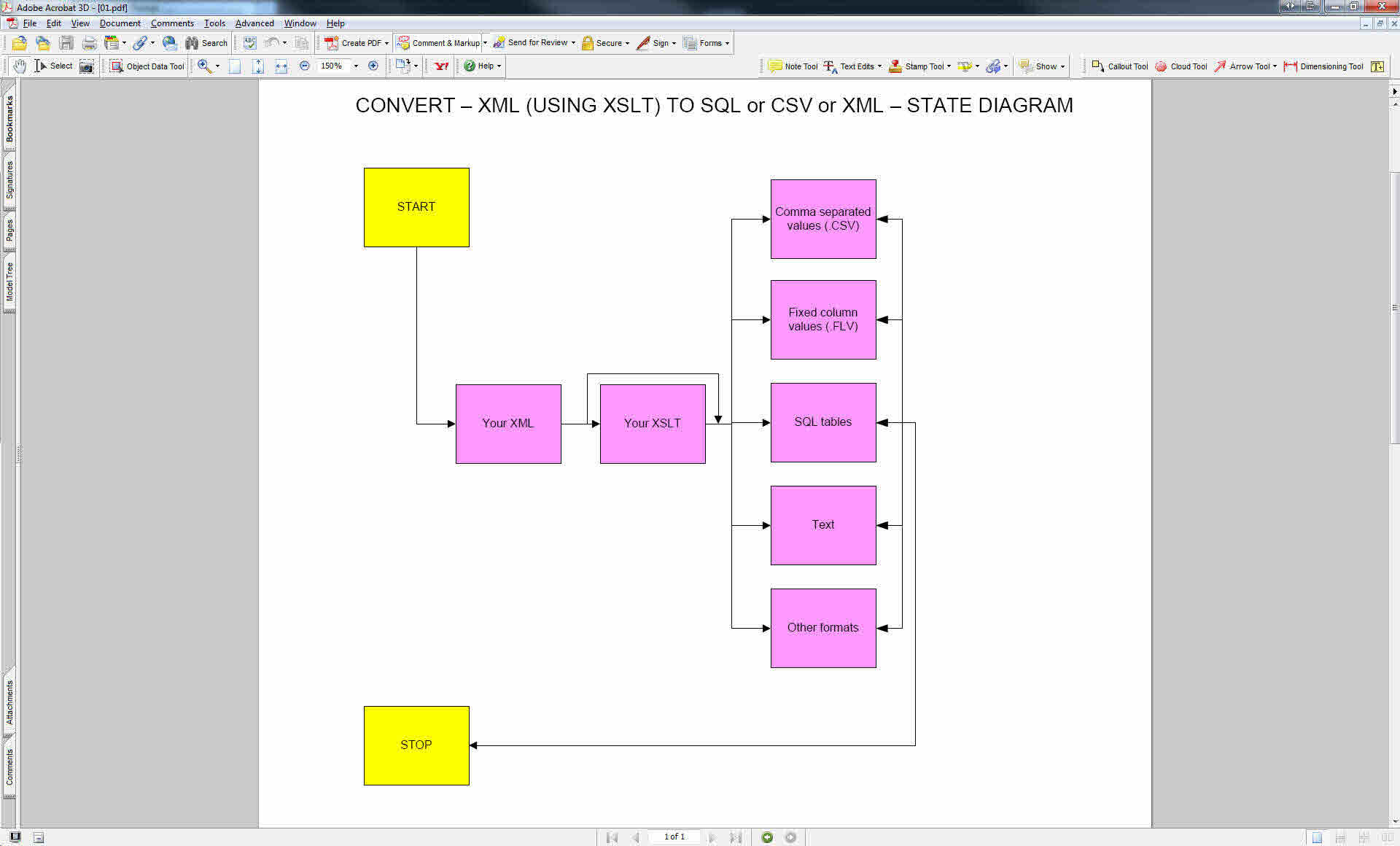
State diagram: Converting XML (using XSLT) to SQL database table, comma separated values (CSV), XML, ...
===
File: see also:
===
File: version: control: see also:
===
Help: see also:
===
Image: see also:
 ===
Internet: see also:
Starting from MySql v6.0 there is a command to directly load a .XML file in a MySql database table.
http://dev.mysql.com/tech-resources/articles/xml-in-mysql5.1-6.0.html#xml-5.1-importing
---
XML: Importing and exporting your XML files in and to MySql
http://rpbouman.blogspot.com/2006/03/importing-xml-data-into-mysql-using.html
---
Computer: Editor: TSE: Comma separated values: How to convert comma separated value files to fixed value files?
http://goo.gl/IOjXC
===
Podcast: see also:
===
Record: see also:
===
Screencast: see also:
===
Table: see also:
===
Video: see also:
===
<version>1.0.0.0.5</version>
----------------------------------------------------------------------
===
Internet: see also:
Starting from MySql v6.0 there is a command to directly load a .XML file in a MySql database table.
http://dev.mysql.com/tech-resources/articles/xml-in-mysql5.1-6.0.html#xml-5.1-importing
---
XML: Importing and exporting your XML files in and to MySql
http://rpbouman.blogspot.com/2006/03/importing-xml-data-into-mysql-using.html
---
Computer: Editor: TSE: Comma separated values: How to convert comma separated value files to fixed value files?
http://goo.gl/IOjXC
===
Podcast: see also:
===
Record: see also:
===
Screencast: see also:
===
Table: see also:
===
Video: see also:
===
<version>1.0.0.0.5</version>
----------------------------------------------------------------------
