 ===
Internet: see also:
===
Podcast: see also:
===
Screencast: see also:
===
Table: see also:
===
Video: see also:
---
----------------------------------------------------------------------
===
Internet: see also:
===
Podcast: see also:
===
Screencast: see also:
===
Table: see also:
===
Video: see also:
---
----------------------------------------------------------------------
----------------------------------------------------------------------
--- Knud van Eeden --- 14 August 2008 - 07:31 pm ---------------------
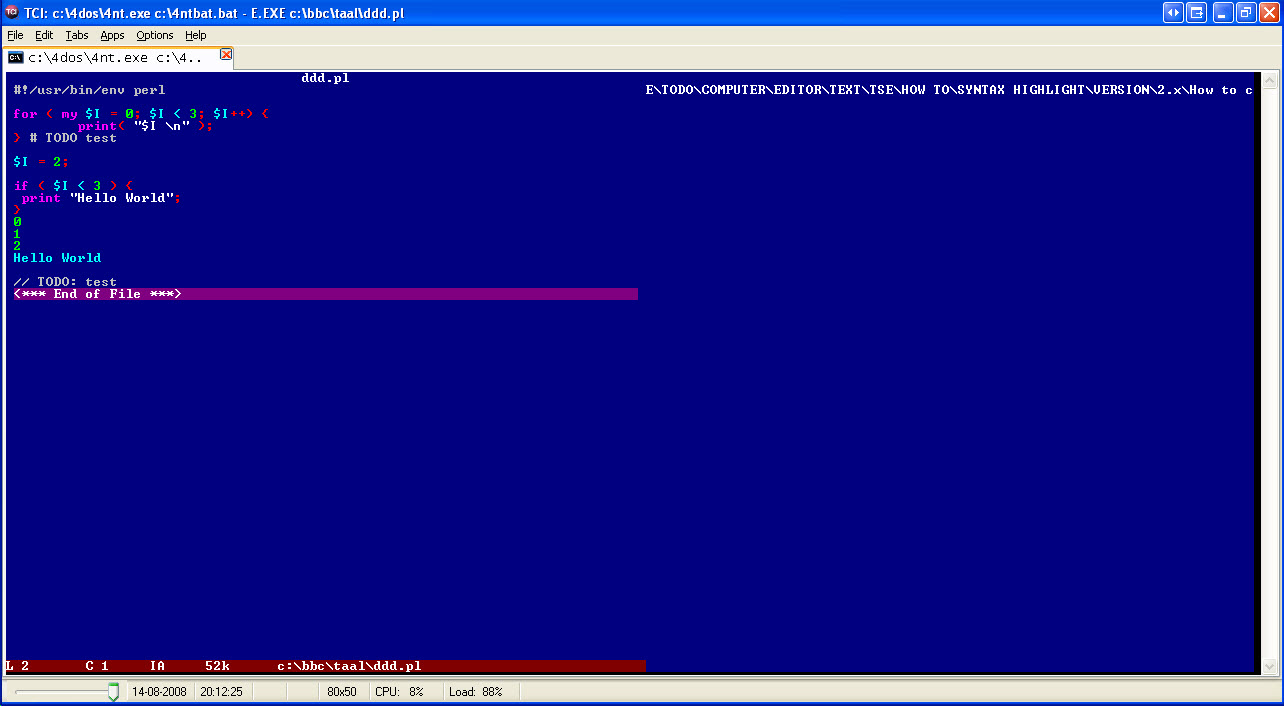
Computer: Editor: TSE: Color: Syntax highlighting: Perl: File: Create: TSE: v2.x: How to create a syntax highlighting file for Perl .pl files?
===
Steps: Overview:
1. -Possibly read the files
(located in your TSE directory
..\mac\color\)
custom.doc
and
colors.doc
for more information
2. -Find all keywords for that language
1. -E.g.
Perl
1. -For example, download the .stx file for that language (e.g. Perl)
from
http://www.editplus.com/files.html
-- or --
1. -Search search engine
1. -Google
2. -Other
3. -Edit this file(s), so only the keywords are left
4. -Possibly divide this keywords in groups, according to color
5. -The color are built from 'G' followed by 'A', 'B', 'C', 'D', 'E', 'F', ...
1. -E.g.
GA
GB
GC
GD
GE
GF
indicated each a different color
6. -Add this color at the end of this keywords
1. -E.g.
yourkeyword1 GA
yourkeyword2 GB
yourkeyword3 GB
will show yourkeyword1 in a color and
yourkeyword2 and yourkeyword3 in some other color.
7. -Take a (similar) syntax highlight file from the color directory
(..mac\color\) and edit this file for your language
8. -Insert your keywords for that language
9. -Now ask yourself what the file extension is for the files
you want to syntax highlight.
1. -You know that the typical file extension for
Perl is
pl
10. -Save your syntax highligh with the name, in general
<your file extension>COLOR.TSE
1. -In the case of Perl, that is thus
plCOLOR.TSE
11. -Save this file in your TSE directory
..\mac\color\
(you should see similar names file there, like
sCOLOR.TSE, asmCOLOR.TSE, ...)
12. -This is a possible Perl syntax highlight color
file for TSE v2.5 or lower.
Save it thus as
PLCOLOR.TSE in your ..\mac\color\.. directory
--- cut here: begin --------------------------------------------------
--> GA DTR
// GA DET
# GA DET
<!-- GA DTM
0 GB SW
1 GB SW
2 GB SW
3 GB SW
4 GB SW
5 GB SW
6 GB SW
7 GB SW
8 GB SW
9 GB SW
! GC ST
" GF S
" GF XQE
$ GD TG
% GC TG
& GC TG
( GC TG
) GC TG
* GC TG
+ GC TG
, GC TG
- GC TG
/ GC TG
: GC TG
; GC TG
< GC TG
= GC TG
> GC TG
? GC TG
[ GC TG
\ GC TG
] GC TG
^ GC TG
{ GC TG
| GC TG
} GC TG
~ GC TG
abs GD
accept GD
alarm GD
and GD
atan2 GD
bind GD
binmode GD
bless GD
caller GD
chdir GD
chmod GD
chomp GD
chop GD
chown GD
chr GD
chroot GD
close GD
closedir GD
cmp GD
connect GD
continue GD
cos GD
crypt GD
dbmclose GD
dbmopen GD
defined GD
delete GD
die GD
do GD
dump GD
each GD
eacheof GD
else GD
elsif GD
endgrent GD
endhostent GD
endnetent GD
endprotoent GD
endpwent GD
endservent GD
eof GD
eq GD
eval GD
exec GD
exists GD
exit GD
exp GD
fcntl GD
fileno GD
flock GD
for GD
foreach GD
fork GD
format GD
formline GD
ge GD
getc GD
getgrent GD
getgrgid GD
getgrnam GD
getgrp GD
gethostbyaddr GD
gethostbyname GD
gethostent GD
getlogin GD
getnetbyaddr GD
getnetbyname GD
getnetent GD
getpeername GD
getpgrp GD
getppid GD
getpriority GD
getprotobyname GD
getprotobynumber GD
getprotoent GD
getpwent GD
getpwnam GD
getpwuid GD
getrnam GD
getservbyname GD
getservbyport GD
getservent GD
getsocketname GD
getsocketopt GD
getsockname GD
getsockopt GD
glob GD
gmtime GD
goto GD
grep GD
gt GD
hex GD
if GD
import GD
index GD
int GD
ioctl GD
join GD
keys GD
kill GD
last GD
lc GD
lcfirst GD
le GD
length GD
link GD
listen GD
local GD
localtime GD
lock GD
log GD
lstat GD
lt GD
m GD
map GD
mkdir GD
msgctl GD
msgget GD
msgrcv GD
msgsnd GD
my GD
ne GD
new GD
next GD
no GD
not GD
oct GD
open GD
opendir GD
or GD
ord GD
our GD
pack GD
package GD
pipe GD
pop GD
pos GD
print GD
printf GD
prototype GD
push GD
q GD
qq GD
qr GD
quotemeta GD
qw GD
qx GD
rand GD
read GD
readdir GD
readline GD
readlink GD
readpipe GD
recv GD
redo GD
ref GD
rename GD
require GD
reset GD
return GD
reverse GD
rewinddir GD
rindex GD
rmdir GD
s GD
scalar GD
seek GD
seekdir GD
select GD
semctl GD
semget GD
semop GD
send GD
setgrent GD
sethostent GD
setnetent GD
setpgrp GD
setpriority GD
setprotoent GD
setpwent GD
setservent GD
setsocketopt GD
setsockopt GD
shift GD
shmctl GD
shmget GD
shmread GD
shmwrite GD
shutdown GD
sin GD
sleep GD
socket GD
socketpair GD
sort GD
splice GD
split GD
sprintf GD
sqrt GD
srand GD
stat GD
study GD
sub GD
substr GD
symlink GD
syscall GD
sysopen GD
sysread GD
sysseek GD
system GD
syswrite GD
tell GD
telldir GD
tie GD
tied GD
time GD
times GD
tr GD
truncate GD
uc GD
ucfirst GD
umask GD
undef GD
unless GD
unlink GD
unpack GD
unshift GD
untie GD
until GD
use GD
utime GD
values GD
vec GD
wait GD
waitpid GD
wantarray GD
warn GD
warranty GD
while GD
write GD
x GD
xor GD
y GD
GE
BODY GE
BR GE
DIV GE
FRAME GE
FRAMESET GE
HEAD GE
HTML GE
IMG GE
INPUT GE
META GE
NOFRAMES GE
SCRIPT GE
TABLE GE
TD GE
TH GE
TITLE GE
TR GE
--- cut here: end ----------------------------------------------------
13. -Now inform TSE about your new syntax highlight
intentions, by recompiling the macro 'colors.s',
by following the below steps
14. Backup and change the file
(located in your ..\mac\.. directory)
COLORS.S
15. -Edit this file and search for
--- cut here: begin --------------------------------------------------
proc mResolveGroupExtensions(var string s)
case s
// resolve to TSE's ".s" files
when ".s", ".inc", ".key", ".ui", ".sal"
s = ".s"
// resolve some of the common "c type" file extensions to just ".c"
when ".c", ".cpp", ".h", ".hpp", ".rc"
s = ".c"
// resolve some cobol extensions
when ".cbl", ".cob"
s = ".cbl"
// Add your own custom group "when" statement(s) in here...
endcase
end mResolveGroupExtensions
--- cut here: end ----------------------------------------------------
16. -Add your new file extension(s) there
(other file extensions you might also want to show with the same
Perl
syntax highlighting.
In that case just add these file extensions also here)
--- cut here: begin --------------------------------------------------
proc mResolveGroupExtensions(var string s)
case s
// resolve to TSE's ".s" files
when ".s", ".inc", ".key", ".ui", ".sal"
s = ".s"
// resolve some of the common "c type" file extensions to just ".c"
when ".c", ".cpp", ".h", ".hpp", ".rc"
s = ".c"
// resolve some cobol extensions
when ".cbl", ".cob"
s = ".cbl"
// resolve some perl extensions
when ".pl"
s = ".pl"
// Add your own custom group "when" statement(s) in here...
endcase
end mResolveGroupExtensions
--- cut here: end ----------------------------------------------------
17. -Save this file
colors.s
18. -Recompile this file
(e.g. menu 'Macro'->'Compile')
colors.s
19. -Execute the macro, and choose from list
'Add colors to autoload list'
20. -Now files with the extension .pl
should show that keywords with the colors you defined
---
Tested successfully on
Microsoft Windows XP Professional (service pack 2),
running
TSE v2.5
===
Book: see also:
===
Diagram: see also:
===
File: see also:
===
Help: see also:
===
Image: see also:
===
Internet: see also:
===
Podcast: see also:
===
Screencast: see also:
===
Table: see also:
===
Video: see also:
---
----------------------------------------------------------------------