x = -x
--- cut here: end ----------------------------------------------------
This is a special case of a rotation over 180 degrees.
It follows from the general form of the (2D) linear
transformation
--- cut here: begin --------------------------------------------------
xnew = a11 . xold + a21 . yold
ynew = a21 . xold + a22 . yold
--- cut here: end ----------------------------------------------------
which can be written as
--- cut here: begin --------------------------------------------------
xnew = cos( rotationangle ) . xold - sin( rotationangle ) . yold
ynew = sin( rotationangle ) . xold + cos( rotationangle ) . yold
--- cut here: end ----------------------------------------------------
thus in the special case if you choose rotationangle equal to
180 degrees you get
--- cut here: begin --------------------------------------------------
xnew = cos( 180 degrees ) . xold - sin( 180 degrees ) . yold
ynew = sin( 180 degrees ) . xold + cos( 180 degrees ) . yold
--- cut here: end ----------------------------------------------------
or thus
--- cut here: begin --------------------------------------------------
xnew = ( -1 ) . xold - ( 0 ) . yold
ynew = ( 0 ) . xold + ( -1 ) . yold
--- cut here: end ----------------------------------------------------
or thus
--- cut here: begin --------------------------------------------------
xnew = -xold
ynew = -yold
--- cut here: end ----------------------------------------------------
In other words, if you rotate around a central axis over 180
degrees, you flip signs (x=-x).
By repeating this rotation over 180 degrees twice, or thus you rotate
over 360 degrees, a full circle, you get
--- cut here: begin --------------------------------------------------
-(-x)
--- cut here: end ----------------------------------------------------
and this is thus by definition (minus times minus gives plus) the same as
--- cut here: begin --------------------------------------------------
x
--- cut here: end ----------------------------------------------------
and you have thus your original back again, or you are thus
back in the same x position.
A series of repetitions that is a multiple of 2 brings it back
in the original position.
2. -The rotation axis is located at the half (for symmetry purposes) of the range
1. -In general this axis position in the middle of 2 given numbers is at
--- cut here: begin --------------------------------------------------
( number1 + number2 ) / 2
number1
-----------------|
number2
-----------------------------------------|
number1
-----------------|-----------------------|
<-- number2-number1 -->
number at half between
-----------------|-----------|-----------|
^
|
= number1 + ( number2 - number1 ) / 2
= number1 + (number2) / 2 - (number1) / 2
= number1 / 2 + number2 / 2
= ( number1 + number2 ) / 2
--- cut here: end ----------------------------------------------------
2. -The middle of two numbers, begin and end is thus similarly located at
--- cut here: begin --------------------------------------------------
( begin + end ) / 2
--- cut here: end ----------------------------------------------------
---
2. -This principle of swapping around a central axis you can apply to a
character range, a text position range, ...
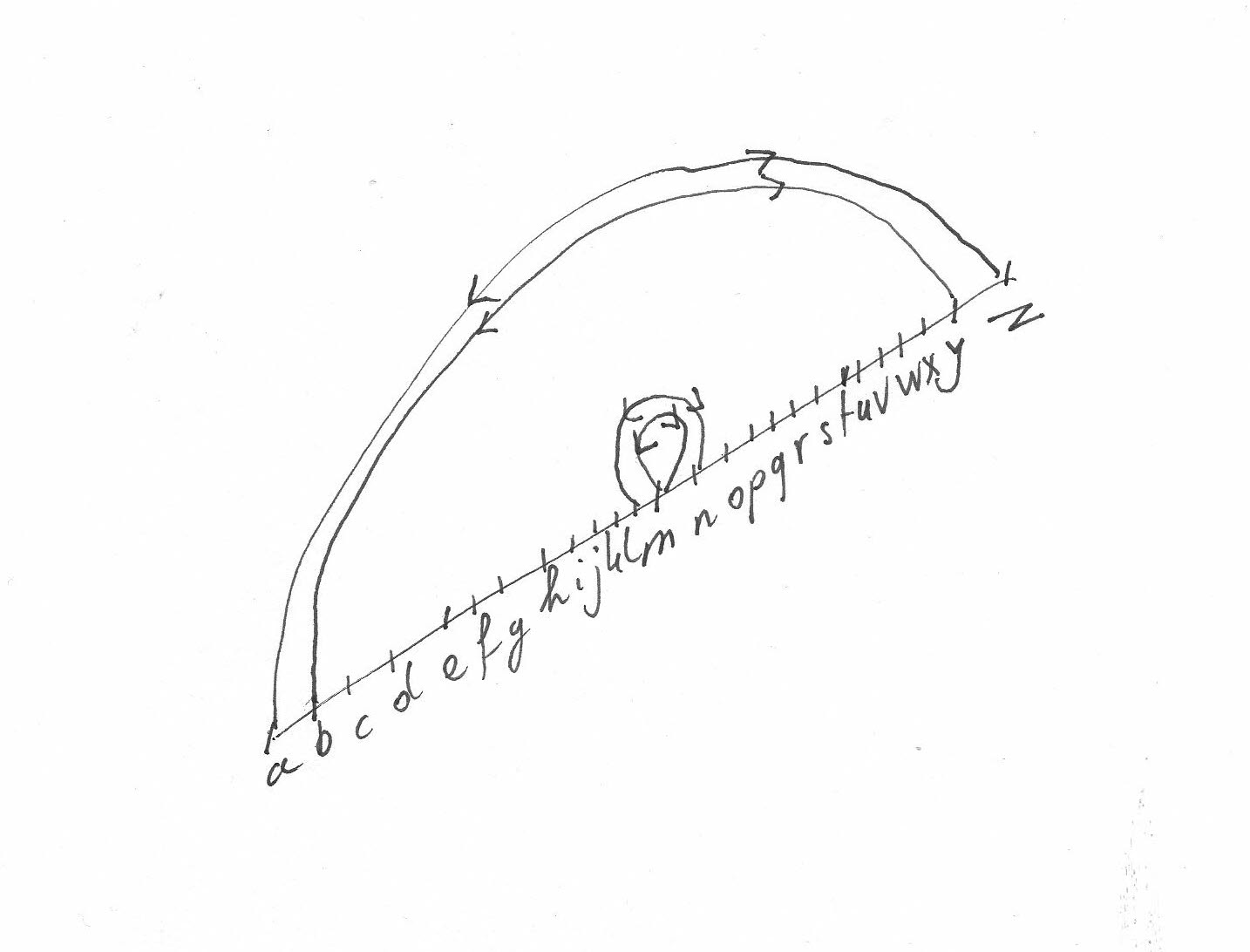
1. -Special case of swapping around central axis: Character: Choose the central axis in the middle the English alphabet
1. -rot( 13 ) encryption:
Swapping is a special case of a rotation.
You 'ROT'ate here at character position 13.
Thus it is called rot( 13).
1. -In general this central axis position is at
( begin + end ) / 2
2. -here the central axis is located at the center of the English alphabet.
There are 26 characters in the English alphabet.
Thus the axis is located at
( 1 + 26 ) / 2
= 27/2
= 13.5
= Rounding this to 13 gives the central axis at the character 'm'
English alphabet
abcdefghijklmnopqrstuvwxyz
^
|
middle
3. -Characters are thus swapped around this axis
Thus a is swapped with n
b is swapped with o
...
m is swapped with m -- thus the central character is swapped with itself
...
k is swapped with y
l is swapped with z
4. -TSE macro (published earlier) illustrating this principle
1. -E.g.
This simple Caesar-cypher encryption that replaces
each English letter with the one 13 places forward
or back along the alphabet, so that "The butler
did it!" becomes "Gur ohgyre qvq vg!"
--- cut here: begin --------------------------------------------------
proc Rot13()
BegFile()
loop
case CurrChar()
when Asc('a')..Asc('m'), Asc('A')..Asc('M')
InsertText(Chr(CurrChar() + 13), _OVERWRITE_)
when Asc('n')..Asc('z'), Asc('N')..Asc('Z')
InsertText(Chr(CurrChar() - 13), _OVERWRITE_)
otherwise
if not NextChar()
break
endif
endcase
endloop
end
<F12> Rot13()
--- cut here: end ----------------------------------------------------
===
Self-inverse:
If you then once press <F12> you will see this macro
source text change to:
--- cut here: begin --------------------------------------------------
cebp Ebg13()
OrtSvyr()
ybbc
pnfr PheePune()
jura Nfp('n')..Nfp('z'), Nfp('N')..Nfp('Z')
VafregGrkg(Pue(PheePune() + 13), _BIREJEVGR_)
jura Nfp('a')..Nfp('m'), Nfp('A')..Nfp('M')
VafregGrkg(Pue(PheePune() - 13), _BIREJEVGR_)
bgurejvfr
vs abg ArkgPune()
oernx
raqvs
raqpnfr
raqybbc
raq
<s12> Ebg13()
--- cut here: end ----------------------------------------------------
===
And if you press <F12> once again, you get the original
source code back.
===
Most Usenet news reading and posting programs include a rot13 feature.
---
It is e.g. used to enclose the text in a sealed wrapper that the reader
must choose to open -- e.g., for posting things that might offend some
readers, or spoilers.
---
2. -Special case of swapping around central axis: Character: Choose the central axis in the middle of the ASCII 33 to ASCII 255 range
1. -In general this central axis position is at
1. -In general this axis position is at
--- cut here: begin --------------------------------------------------
( begin + end ) / 2
--- cut here: end ----------------------------------------------------
2. -Thus here the central axis is located at
--- cut here: begin --------------------------------------------------
( 33 + 255 ) / 2
= 288 / 2
= 144
--- cut here: end ----------------------------------------------------
3. -Thus
--- cut here: begin --------------------------------------------------
character ASC( 33 ) is swapped with character ASC( 255 )
character ASC( 34 ) is swapped with character ASC( 254 )
character ASC( 35 ) is swapped with character ASC( 253 )
...
character ASC( 144 ) is swapped with character ASC( 144 ) -- thus the central character is swapped with itself
--- cut here: end ----------------------------------------------------
and here you can stop, because if you should continue, you
because you should undo your action, e.g.
character ASC( 145 ) should swapped with character ASC( 143 ),
so basically putting this characters back in their original
position.
Because all this central axis swapping methods are self inverse, this
code is also self inverse. The same code encodes and decodes.
Or thus running it once encodes. And running it twice decodes. And so on.
3. -This principle you can apply to a text position range
1. -Special case of swapping around central axis: Text: Choose the central axis in the middle of the given string (reversing a string)
1. -The axis is located at the half of the range
1. -In general this central axis position is at
--- cut here: begin --------------------------------------------------
( begin + end ) / 2
--- cut here: end ----------------------------------------------------
2. -Thus here the central axis is located at
--- cut here: begin --------------------------------------------------
( 1 + Length() ) / 2
--- cut here: end ----------------------------------------------------
3. -You can thus write the following source code to reverse a string
This is a rather optimal algorithm in terms of operations needed.
Linear, needing in the order of N/2 operations.
4. -E.g. create the following program:
--- cut here: begin --------------------------------------------------
// filenamemacro=getstrro.s
--- cut here: end ----------------------------------------------------
--- cut here: begin --------------------------------------------------
// STRING PROC FNStringGetReverseRotateS( STRING oldS )
--- cut here: end ----------------------------------------------------
--- cut here: begin --------------------------------------------------
FORWARD PROC Main()
FORWARD STRING PROC FNStringGetReverseRotateS( STRING s1 )
// --- MAIN --- //
PROC Main()
STRING s[ MAXSTRINGLEN ] = "test"
//
IF ( NOT Ask( "string to reverse ", s ) )
RETURN()
ENDIF
//
Message( FNStringGetReverseRotateS( s ) )
END
// --- LIBRARY --- //
// library: string: get: reverse: rotate <description></description> <version control></version control> <version>1.0.0.0.1</version> (filenamemacro=getstrro.s) [kn, ri, sa, 01-03-2008 19:08:20]
STRING PROC FNStringGetReverseRotateS( STRING oldS )
// e.g. PROC Main()
// e.g. STRING s[ MAXSTRINGLEN ] = "test"
// e.g. //
// e.g. IF ( NOT Ask( "string to reverse ", s ) )
// e.g. RETURN()
// e.g. ENDIF
// e.g. //
// e.g. Message( FNStringGetReverseRotateS( s ) )
// e.g. END
//
// This algorithm needs in the order of ((string length) / 2) steps
// Which is about 2 times as fast as the usual order of (string length) steps
// algorithms. So should be one of the fastest algorithms to reverse a string
//
//
STRING s[ MAXSTRINGLEN ] = oldS
STRING characterTemporaryS[1] = ""
//
INTEGER minI = 1
INTEGER maxI = Length( s )
INTEGER I = 0
INTEGER middleI = ( minI + maxI ) / 2
//
FOR I = minI TO middleI
//
// swap around the central axis
//
characterTemporaryS = s[ I ]
s[ I ] = s[ maxI - I + minI ]
s[ maxI - I + minI ] = characterTemporaryS
//
ENDFOR
//
RETURN( s )
//
END
--- cut here: end ----------------------------------------------------
===
Thus from
--- cut here: begin --------------------------------------------------
s[ I ] = s[ maxI - I + minI ]
--- cut here: end ----------------------------------------------------
follows that the character at minimum position (=minI) is swapped with
character at maximum position (=maxI).
--- cut here: begin --------------------------------------------------
s[ minI ] = s[ maxI - (minI) + minI ] = s[ maxI ]
--- cut here: end ----------------------------------------------------
Further the character at the mininum + 1 position is swapped with character at maximum position - 1 position
--- cut here: begin --------------------------------------------------
s[ minI + 1 ] = s[ maxI - (minI + 1) + minI ] = s[ maxI - minI - 1 + minI ] = s[ maxI - 1 ]
--- cut here: end ----------------------------------------------------
Further the character at the mininum + 2 position is swapped with character at maximum position - 2 position
--- cut here: begin --------------------------------------------------
s[ minI + 2 ] = s[ maxI - (minI + 2) + minI ] = s[ maxI - minI - 2 + minI ] = s[ maxI - 2 ]
--- cut here: end ----------------------------------------------------
In general
--- cut here: begin --------------------------------------------------
s[ minI + J ] = s[ maxI - (minI + J) + minI ] = s[ maxI - minI - J + minI ] = s[ maxI - J ]
--- cut here: end ----------------------------------------------------
---
So one grows (=+J) from one end (=minI), the other diminishes (=-J)
from the other end (=maxI), so they will reach closer to each other
each step, until they meet at the center.
===
2. -Special case of swapping around central axis: Text: Choose the central axis in the middle of the current line
1. -The axis is located at the half of the range
1. -In general this central axis position is at
--- cut here: begin --------------------------------------------------
( begin + end ) / 2
--- cut here: end ----------------------------------------------------
2. -Thus here the central axis is located at
--- cut here: begin --------------------------------------------------
( 1 + CurrLineLen() ) / 2
--- cut here: end ----------------------------------------------------
1. -If you take in account special characters like spaces,
which should come at the end of the line, and thus by design
are removed by TSE if you save your file, better start
at the first non-space position in the beginning of the line.
Thus use
--- cut here: begin --------------------------------------------------
( PosFirstNonWhite() + CurrLineLen() ) / 2
--- cut here: end ----------------------------------------------------
2. -Then swap each character on the line
3. -You can then e.g. repeat this same action on each line of a block
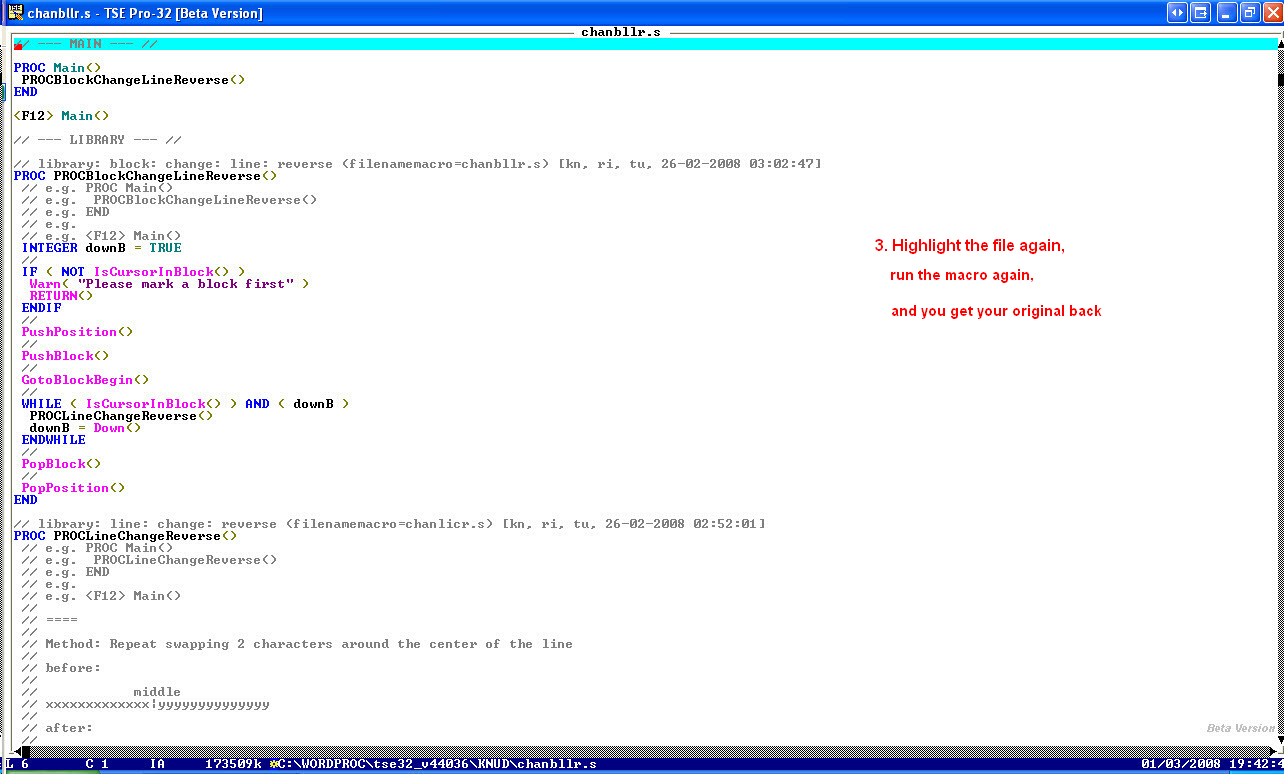
Because all this central axis swapping methods are self inverse, this
code is also self inverse. The same code encodes and decodes.
Or thus running it once encodes. And running it twice decodes. And so on.
===
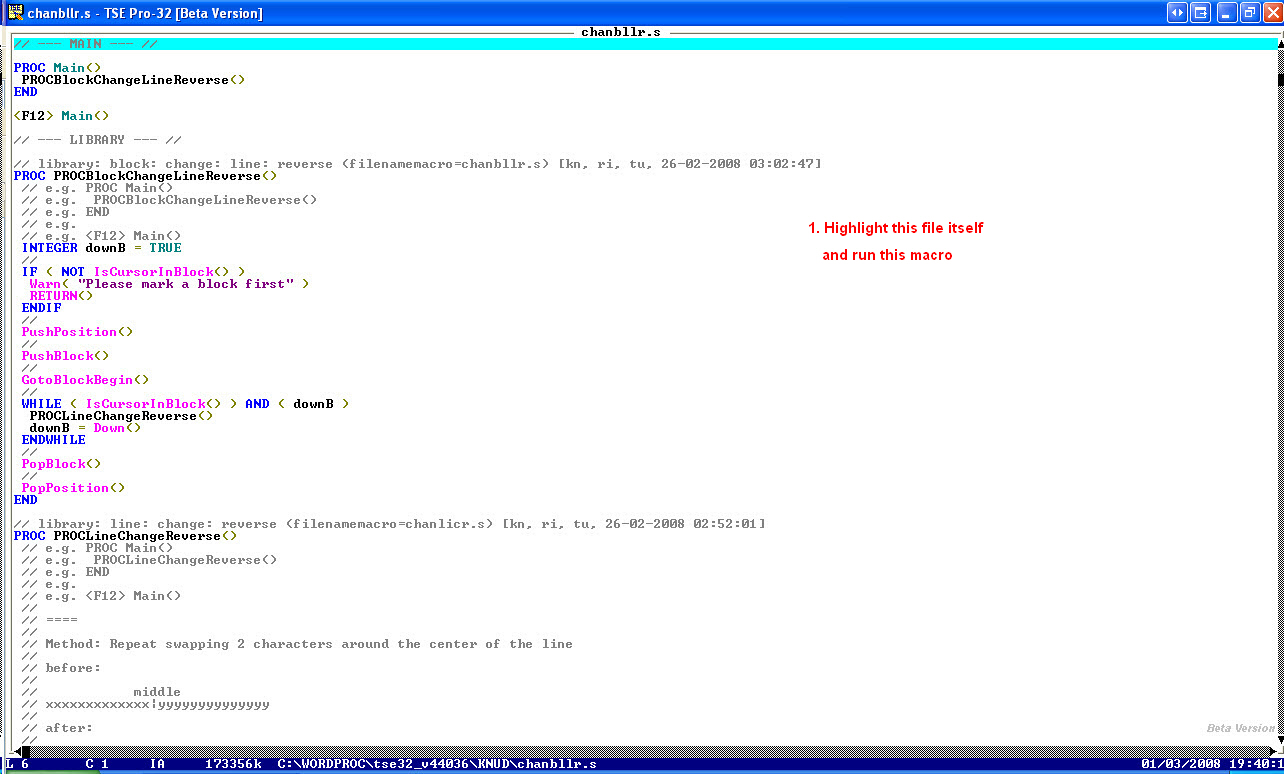
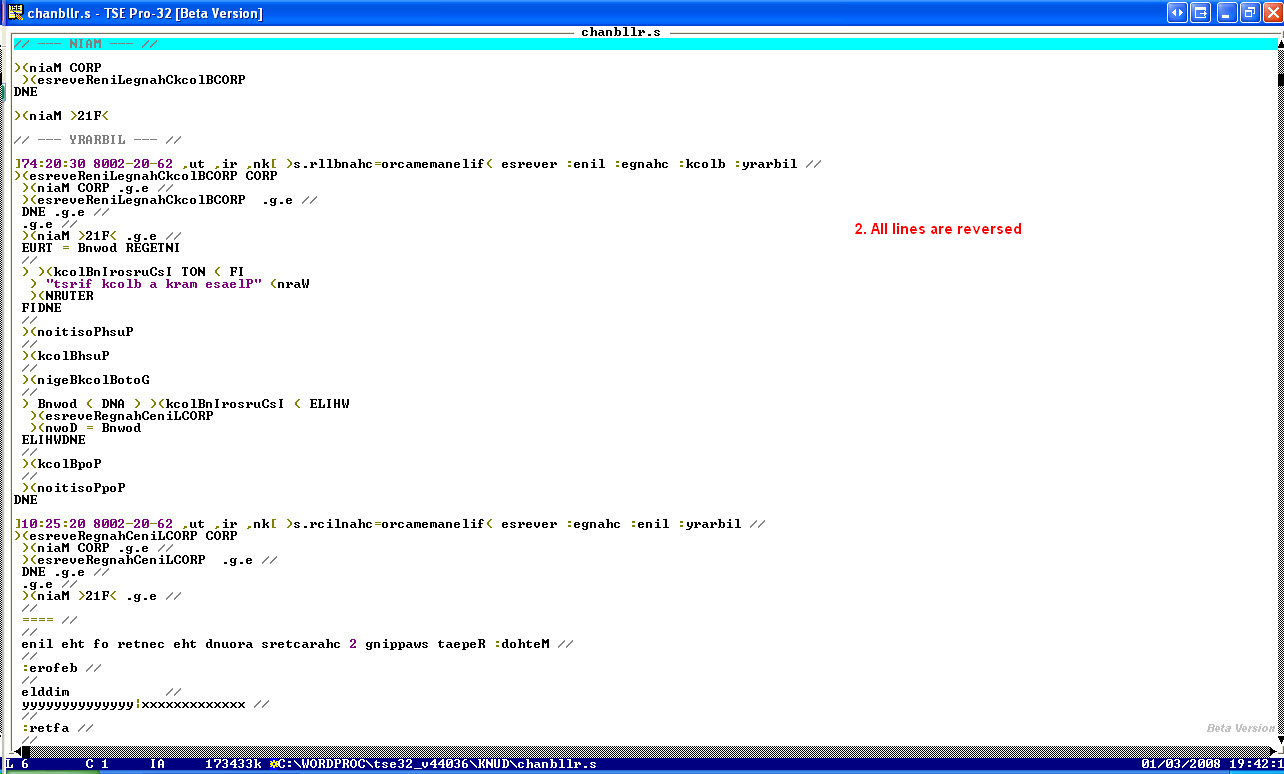
In this example you swap characters around the center of a line
--- cut here: begin --------------------------------------------------
// PROC PROCBlockChangeLineReverse()
--- cut here: end ----------------------------------------------------
---
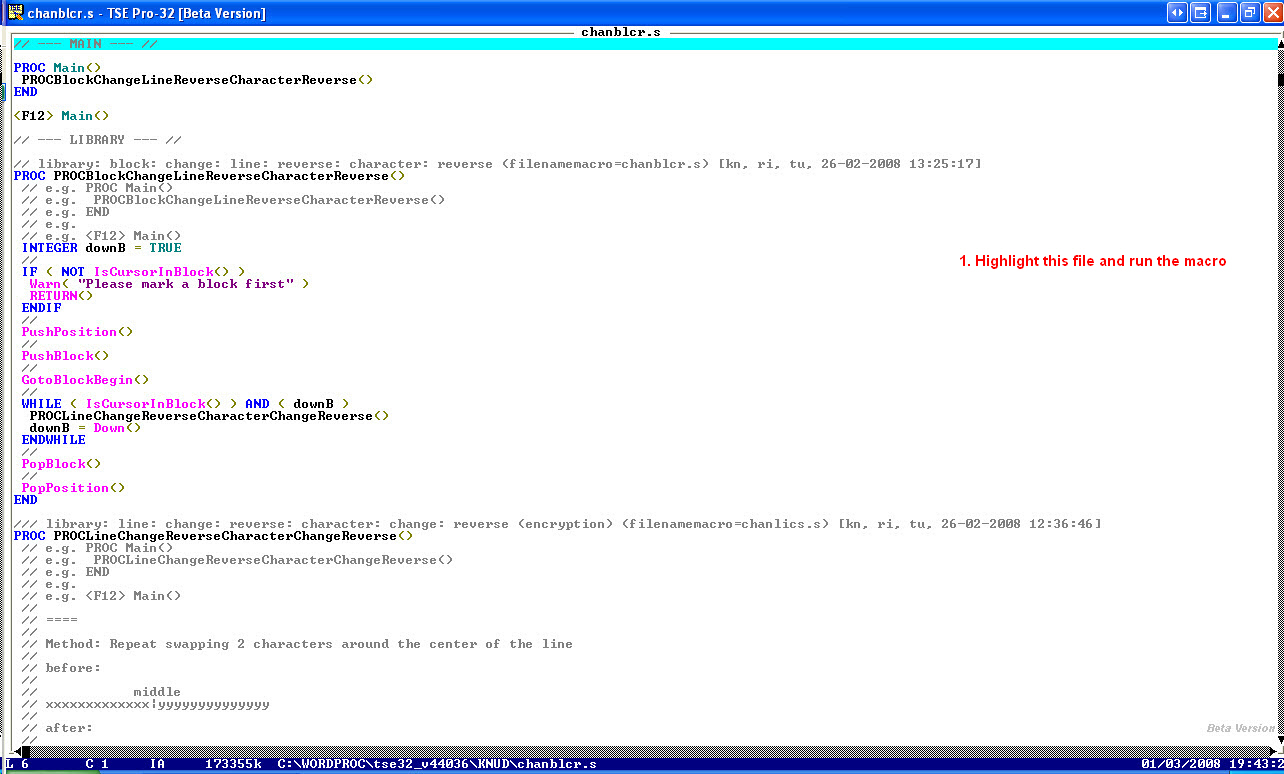
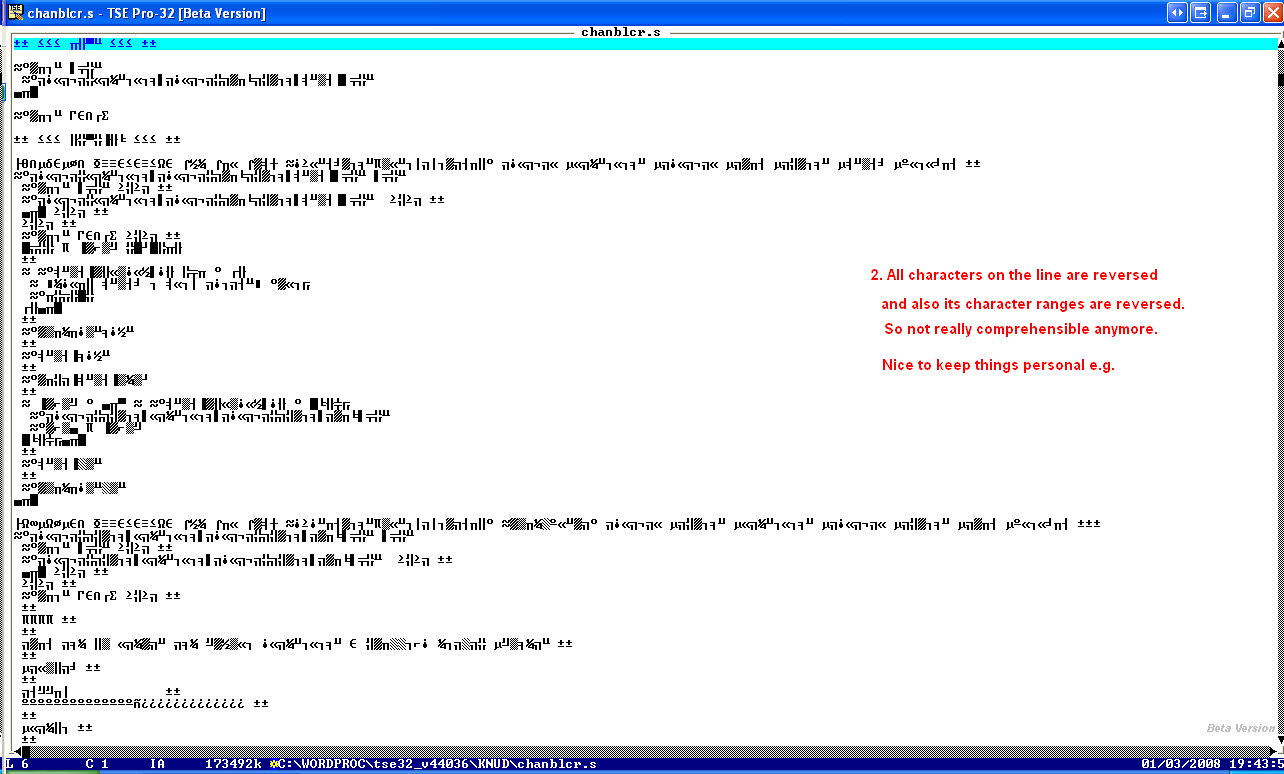
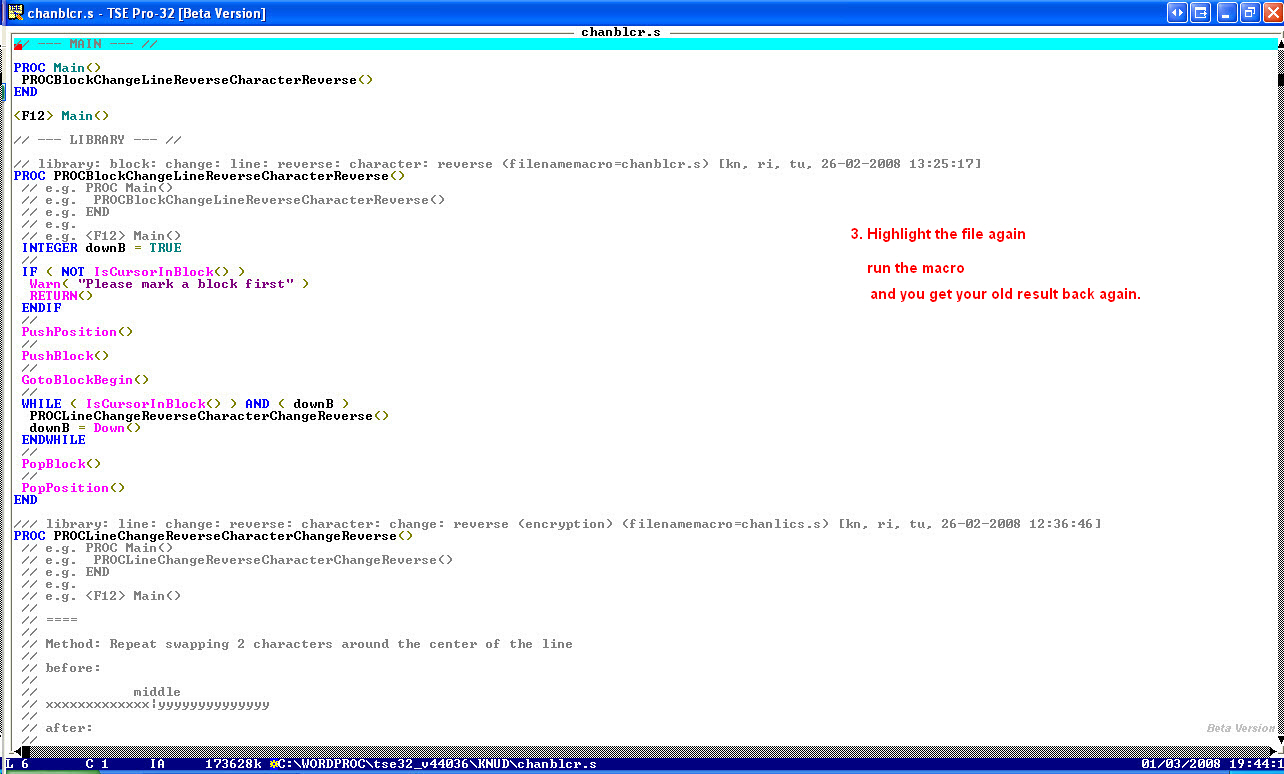
In the following example you see a combination of character range swapping and
text line swapping.
--- cut here: begin --------------------------------------------------
// PROC PROCBlockChangeLineReverseCharacterReverse()
--- cut here: end ----------------------------------------------------
===
Book: see also:
===
Diagram: see also:
===
File: see also:
===
File: version: control: see also:
===
Help: see also:
===
Image: see also:
 ===
Internet: see also:
---
Computer: Editor: Text: TSE: Cryptography: Decryption: Program: Openssl: Link: Can you give an overview of links?
http://goo.gl/Nm8BC
===
Podcast: see also:
===
Record: see also:
===
Screencast: see also:
===
Table: see also:
===
Video: see also:
===
<version>1.0.0.0.6</version>
----------------------------------------------------------------------
===
Internet: see also:
---
Computer: Editor: Text: TSE: Cryptography: Decryption: Program: Openssl: Link: Can you give an overview of links?
http://goo.gl/Nm8BC
===
Podcast: see also:
===
Record: see also:
===
Screencast: see also:
===
Table: see also:
===
Video: see also:
===
<version>1.0.0.0.6</version>
----------------------------------------------------------------------
