----------------------------------------------------------------------
--- Knud van Eeden --- 14 August 2008 - 00:04 am ---------------------
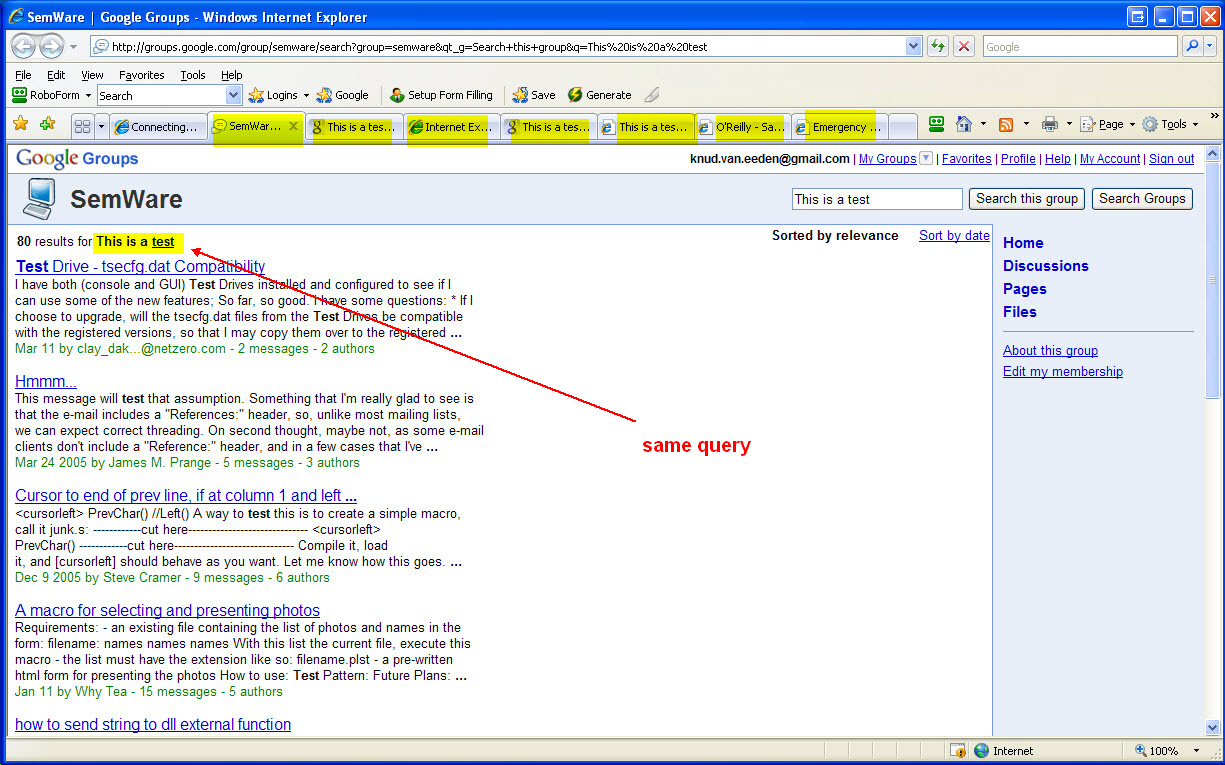
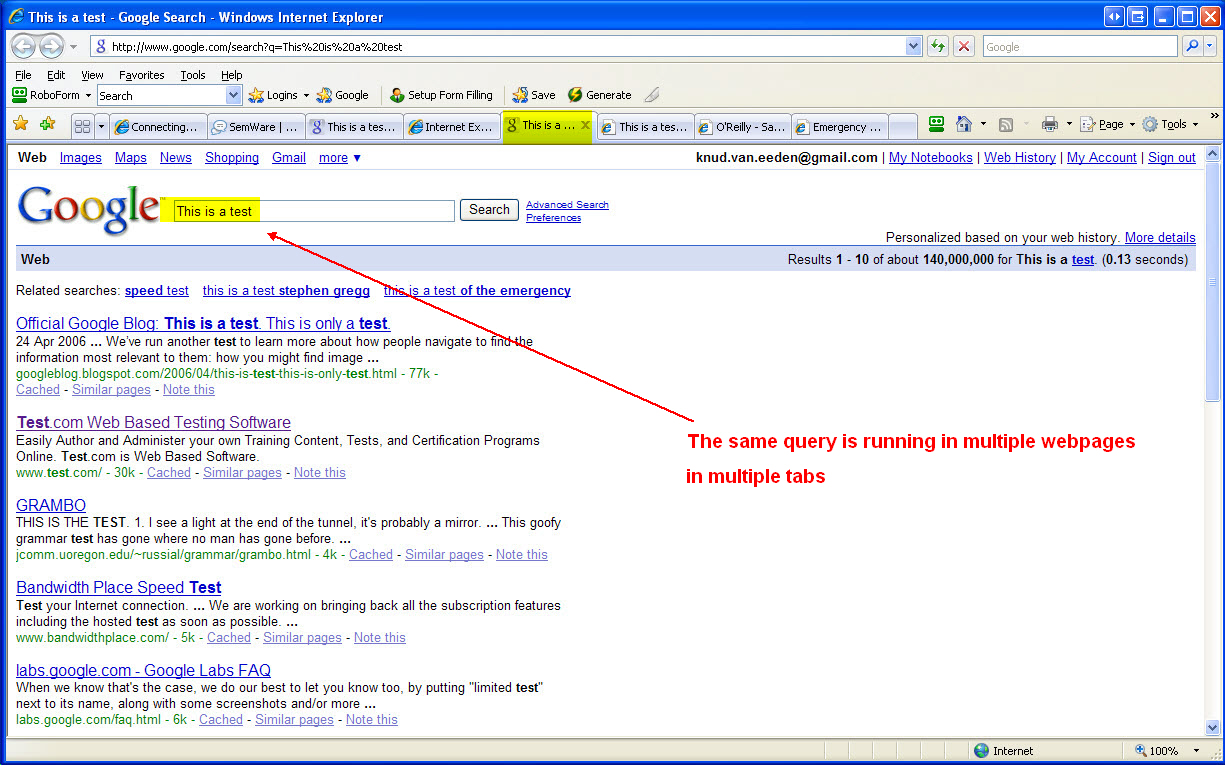
Computer: Editor: TSE: How to search Microsoft Internet Explorer v7 with URLs in multiple tabs simultaneously, with the same query?
===
Steps: Overview:
---
1. If you should get the error 'There is no script engine for file extension .js')
download and install latest Windows Scripting Host v5.7
http://www.microsoft.com/downloads/details.aspx?FamilyID=47809025-D896-482E-A0D6-524E7E844D81&displaylang=en
2. -To create an initialization file, run e.g. the initialization macro once
--- cut here: begin --------------------------------------------------
// library: program: create: browser: tab: multiple: search: ini (filenamemacro=creaprsi.s) [kn, ri, we, 13-08-2008 23:30:48]
PROC PROCProgramCreateBrowserTabMultipleSearchIni( STRING sectionS, STRING fileNameS )
// e.g. PROC Main()
// e.g. PROCProgramCreateBrowserTabMultipleSearchIni( "default", ".\creaprsi.ini" )
// e.g. END
// e.g.
// e.g. <F12> Main()
//
PushPosition()
//
EditFile( fileNameS )
AbandonFile()
EraseDiskFile( fileNameS )
//
EditFile( fileNameS )
//
AddLine( Format( '[', sectionS, ']' ) )
//
AddLine( "" )
//
AddLine( "tab1 = http://groups.google.com/group/semware/search?group=semware&qt_g=Search+this+group&q=" )
AddLine( "tab2 = http://www.google.com/search?btnG=Google+Search&domains=http%3A%2F%2Fwww.knudvaneeden.com&sitesearch=http%3A%2F%2Fwww.knudvaneeden.com&q=" )
AddLine( "tab3 = http://127.0.0.1:4664/search&s=e-1LX6UsENCn1VTNqCLiysd6qk4?q=" )
AddLine( "tab4 = http://www.google.com/search?q=" )
AddLine( "tab5 = http://books.google.com/books?q=" )
AddLine( "tab6 = http://safari.oreilly.com/search?searchmode=simple&searchtextbox=" )
AddLine( "tab7 = http://en.wikipedia.org/wiki/" )
//
// AddLine( "tab8 = http://www.powerset.com/explore/pset?q=" )
// AddLine( "tab9 = http://www.alltheweb.com/search?cat=web&cs=utf-8&l=any&q=" )
// AddLine( "tab10 = http://www.ask.com/web?qsrc=62&q=" )
// AddLine( "tab11 = http://search.dogpile.com/texis/search?q=" )
// AddLine( "tab12 = http://www.hotbot.com/?cobrand=&matchmode=all&datedelta=0&language=any&recordcount=10&descriptiontype=2&modsign1=MC&dateoption=within&placeselection=georegion&query=" )
// AddLine( "tab13 = http://ixquick.com/do/metasearch.pl?cat=web&cat=web&cmd=process_search&language=english&query=" )
// AddLine( "tab14 = http://www.mamma.com/Mamma?qtype=0&query=" )
// AddLine( "tab15 = http://clusty.com/search?input-form=clusty-simple&v%3Asources=webplus&query=" )
// AddLine( "tab16 = http://www.webcrawler.com/webcrawler/ws/redir/rfcp=Other/rfcid=999915/_iceUrlFlag=11?qcat=web&_IceUrl=true&submit=Search&qkw=" )
// AddLine( "tab17 = http://search.yahoo.com/bin/query?p=" )
// AddLine( "tab18 = http://s.teoma.com/search?qcat=1&qsrc=0&q=" )
// AddLine( "tab19 = http://search.live.com/results.aspx?q=" )
// AddLine( "tab20 = http://search.dmoz.org/cgi-bin/search?search=" )
// AddLine( "tab21 = http://www.faqfarm.com/Q/" )
// AddLine( "tab22 = http://www.faqts.com/knowledge_base/search/index.phtml?fid=1&search=" )
// AddLine( "tab23 = http://www.google.com/search?btnG=Search+Directory&hl=en&cat=gwd%2FTop&q=" )
// AddLine( "tab24 = http://search.yahoo.com/search/dir?h=c&p=" )
// AddLine( "tab25 = http://www.answers.com/" )
// AddLine( "tab26 = http://www.hakia.com/search.aspx?q=" )
// AddLine( "tab27 = http://www.cuil.com/search?q=" )
//
// and so on ...
//
SaveFile()
//
AbandonFile()
//
PopPosition()
//
END
--- cut here: end ----------------------------------------------------
3. -That will create (e.g. in the same directory as this macro) an initialization file
(you can also create or edit it afterwards manually
or let it be created by some other program)
which looks like this:
--- cut here: begin --------------------------------------------------
[default]
tab1 = http://groups.google.com/group/semware/search?group=semware&qt_g=Search+this+group&q=
tab4 = http://www.google.com/search?q=
tab5 = http://books.google.com/books?q=
tab6 = http://safari.oreilly.com/search?searchmode=simple&searchtextbox=
tab7 = http://en.wikipedia.org/wiki/
--- cut here: end ----------------------------------------------------
4. -Run this TSE macro
--- cut here: begin --------------------------------------------------
// library: program: run: browser: tab: multiple: search (filenamemacro=runprmse.s) [kn, ri, we, 13-08-2008 23:30:53]
PROC PROCProgramRunBrowserTabMultipleSearch( STRING searchS, STRING sectionS, STRING arrayS, STRING fileNameIniS )
// e.g. PROC Main()
// e.g. //
// e.g. STRING s1[255] = "This is a test"
// e.g. //
// e.g. IF ( NOT ( Ask( "program: run: browser: tab: multiple: search: searchS = ", s1 ) ) )
// e.g. RETURN()
// e.g. ENDIF
// e.g. //
// e.g. PROCProgramRunBrowserTabMultipleSearch( s1, "default", "tab", ".\creaprsi.ini" )
// e.g. END
// e.g.
// e.g. <F12> Main()
//
// Method
//
// 1. If you should get the error 'There is no script engine for file extension .js')
// download and install latest Windows Scripting Host v5.7
//
// http://www.microsoft.com/downloads/details.aspx?FamilyID=47809025-D896-482E-A0D6-524E7E844D81&displaylang=en
//
// 2. -To create an initialization file, run e.g. the initialization macro once
//
// 3. -That will create (in the same directory as this macro) an initialization file
// (you can also create or edit it afterwards manually
// or let it be created by some other program)
// which looks like this:
//
// --- cut here: begin --------------------------------------------------
//
// [default]
//
// tab1 = http://www.semware.com
// tab2 = http://www.google.com
// tab3 = http://www.test.com"
//
// --- cut here: end ----------------------------------------------------
//
// 4. -Start this TSE macro
//
// 5. -Your Microsoft Internet Explorer v7 browser will open with in the tabs that URLs
//
STRING s[255] = ""
INTEGER stopB = FALSE
INTEGER minI = 1
INTEGER I = 0
STRING fileNameTemporaryS[255] = ""
STRING fileNameS[255] = ""
//
PushPosition()
//
//
IF ( NOT ( EditFile( fileNameIniS ) ) )
Warn( Format( "Initialization file", " ", fileNameIniS, " ", "not found. Please create this .ini file manually or run the initialization macro" ) )
PopPosition()
RETURN()
ENDIF
//
fileNameTemporaryS = MakeTempName( ".\" )
//
EditFile( fileNameTemporaryS )
//
AddLine( Format( 'var oIE = new ActiveXObject( "InternetExplorer.Application" )', ";" ) )
//
AddLine( Format( "var navOpenInBackgroundTab = 0x1000", ";" ) )
//
I = minI - 1
//
REPEAT
//
I = I + 1
//
s = GetProfileStr( sectionS, Format( arrayS, Str( I ) ), "<not found>", fileNameIniS )
//
stopB = ( s == "<not found>" )
//
IF ( NOT ( stopB ) )
AddLine( Format( "oIE.Navigate2(", " ", '"', s, searchS, '"', ",", " ", "navOpenInBackgroundTab", " ", ")", ";" ) )
ENDIF
//
UNTIL ( stopB )
//
AddLine( Format( "oIE.Visible = true", ";" ) )
//
fileNameS = Format( SplitPath( fileNameTemporaryS, _NAME_ ), ".js" )
//
SaveAs( fileNameS )
//
EditFile( fileNameS )
//
IF ( NOT ( StartPgm( "wscript.exe", QuotePath( CurrFilename() ) ) ) )
Warn( Format( "could not execute Windows Script Host file", " ", CurrFilename() ) )
ENDIF
//
Warn( "When your Microsoft Internet Explorer browser has finished loading, please press any key" )
//
EraseDiskFile( fileNameS )
EditFile( fileNameTemporaryS)
AbandonFile()
//
EraseDiskFile( fileNameTemporaryS )
EditFile( fileNameTemporaryS)
AbandonFile()
//
PopPosition()
//
END
------------------------------------------------------------------------------
--- cut here: end ----------------------------------------------------
5. -Your Microsoft Internet Explorer v7 browser will open with in the tabs that URLs, searching for the same string
===
Book: see also:
===
Diagram: see also:
===
File: see also:
===
Help: see also:
===
Image: see also:
 ===
Internet: see also:
===
Podcast: see also:
Computer: Editor: TSE: How to start Microsoft Internet Explorer v7 with URLs in multiple tabs? [parameter/ How to start Microsoft Internet Explorer v7 with multiple tabs from the command line?]
http://www.knudvaneeden.com/tinyurl.php?urlKey=url000156
===
Screencast: see also:
===
Table: see also:
===
Video: see also:
---
---
----------------------------------------------------------------------
===
Internet: see also:
===
Podcast: see also:
Computer: Editor: TSE: How to start Microsoft Internet Explorer v7 with URLs in multiple tabs? [parameter/ How to start Microsoft Internet Explorer v7 with multiple tabs from the command line?]
http://www.knudvaneeden.com/tinyurl.php?urlKey=url000156
===
Screencast: see also:
===
Table: see also:
===
Video: see also:
---
---
----------------------------------------------------------------------